
What is Indux MEC?
Indux MEC is CLEW's motor design software for rapidly exploring and comparing early-stage motor design candidates targeting IE4-class efficiency, using magnetic equivalent circuits (MEC) and empirical models accumulated by Korean research institutes. Finite element analysis (FEA) can be difficult to learn and may take several minutes per case, making it burdensome during the initial design stage. Indux MEC simplifies this process with magnetic equivalent circuits and empirical models, allowing you to compare performance trends across multiple candidates in seconds. Its efficiency results are predictions for initial design and candidate comparison; they do not replace final IE-class determination or pre-production verification.
Indux MEC is designed as AI-native software. Rather than simply placing a chat window beside the UI, it gives both the tree menu operated by a person and the AI assistant processing natural- language requests the same path, the same permissions, and the same real-time updates. See AI directly operates the design below for details.
| Value | Description |
|---|---|
| Cut-and-try speed | Calculate design candidates in seconds using MEC and empirical models, and rapidly explore a broad design space without FEA. |
| AI directly operates the session | The AI does not merely make suggestions: it changes actual design parameters and runs the solver through the same path as a person. |
| Design → analysis → CAD in one workflow | Continue from sizing to production drawings (DXF) and FEM-preprocessing STEP files in a single session without moving files between tools. |
| Grounded in validated engineering knowledge | Built on accumulated theories and empirical models from KERI and KETI, along with material-property data provided by KITECH. |
The Indux product family and Indux MEC
Indux is CLEW's family of motor design and analysis software. It consists of four dedicated software products specialized for different stages of the design process, rather than one monolithic program. This document introduces Indux MEC, one of those products.
| Product | Area of responsibility |
|---|---|
| Indux MEC (this document) | Motor design and analysis based on magnetic equivalent circuits (MEC), from initial sizing through iterative cut-and-try design |
| Indux LFX | Finite element analysis (FEA) |
| Indux Mechanical | Structural and heat-transfer analysis |
| Indux RotoDynamics | Rotor dynamics analysis |
Design geometries generated by Indux MEC can be exported as STEP files for use in the other software products. Indux MEC is the starting point for motor design, while detailed verification is handled by sibling products in the same family.
Supported motor types
All four motor types run on the same magnetic-equivalent-circuit engine and the same project structure, including a shared material pool, shared operating points, and case-specific specifications. Switching motor types means changing the motor-type setting of a case, not opening a different program.
Squirrel-cage induction motor (SCIM)
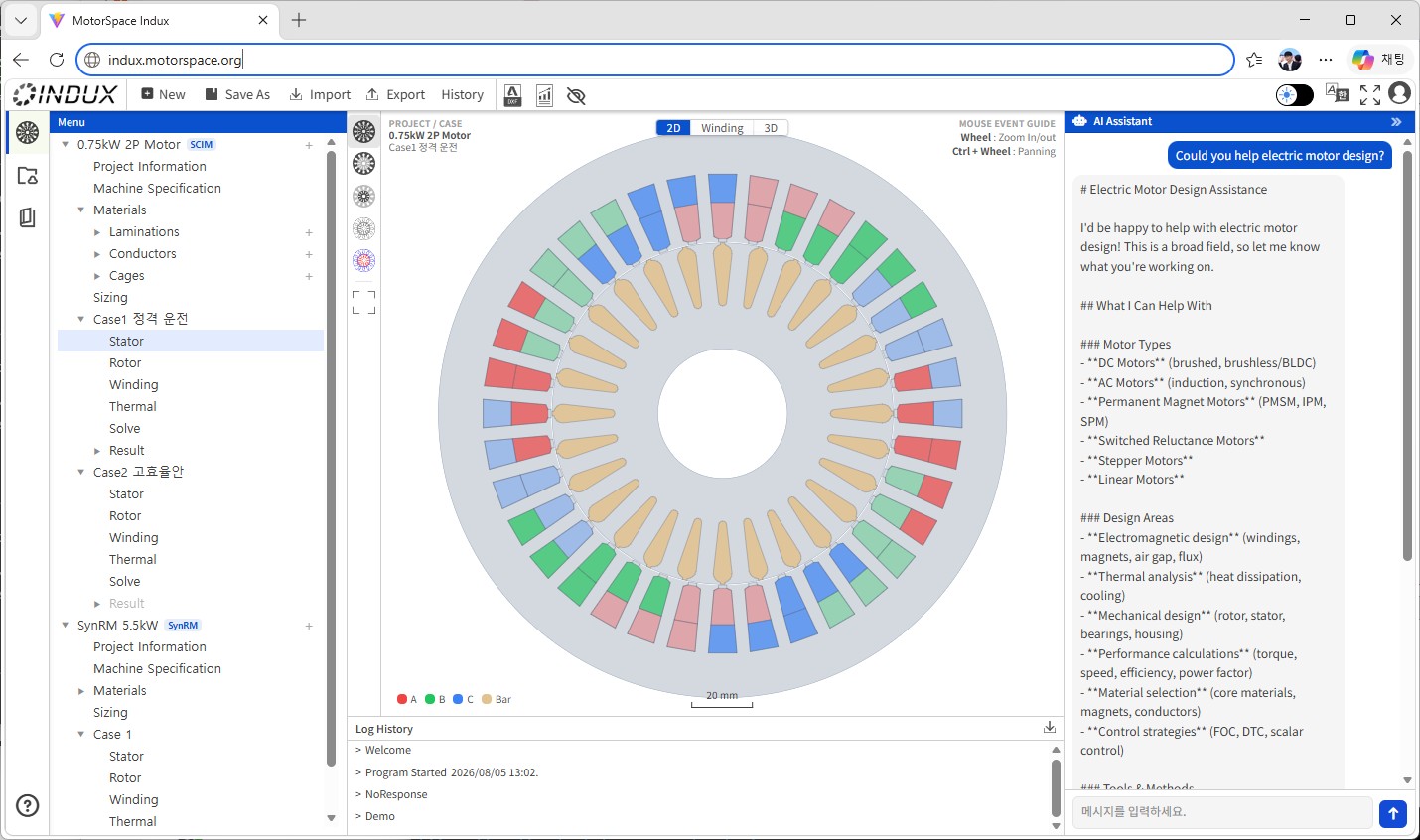
An induction-motor design engine developed from the accumulated experience of the Korea Electrotechnology Research Institute (KERI). It rapidly explores induction-motor design candidates targeting IE4-class efficiency and compares their performance.
- Core sizing based on theory and empirical models
- Six squirrel-cage rotor geometries: rectangular, trapezoidal, round, circular, double-cage, and trapezoidal with a round bottom
- Double-cage rotor: independently specify the materials and geometries of the upper and lower cages to optimize starting characteristics and rated-operation efficiency simultaneously
Line-start permanent-magnet synchronous motor (LSPM)
An LSPM sizing and performance-analysis engine developed from the accumulated experience of the Korea Electronics Technology Institute (KETI).
- Theory-based core sizing that considers both the induction-starting and synchronous-operation regions
- Rotor sizing that includes permanent-magnet placement and magnetization direction
Line-start synchronous reluctance motor (SynRM)
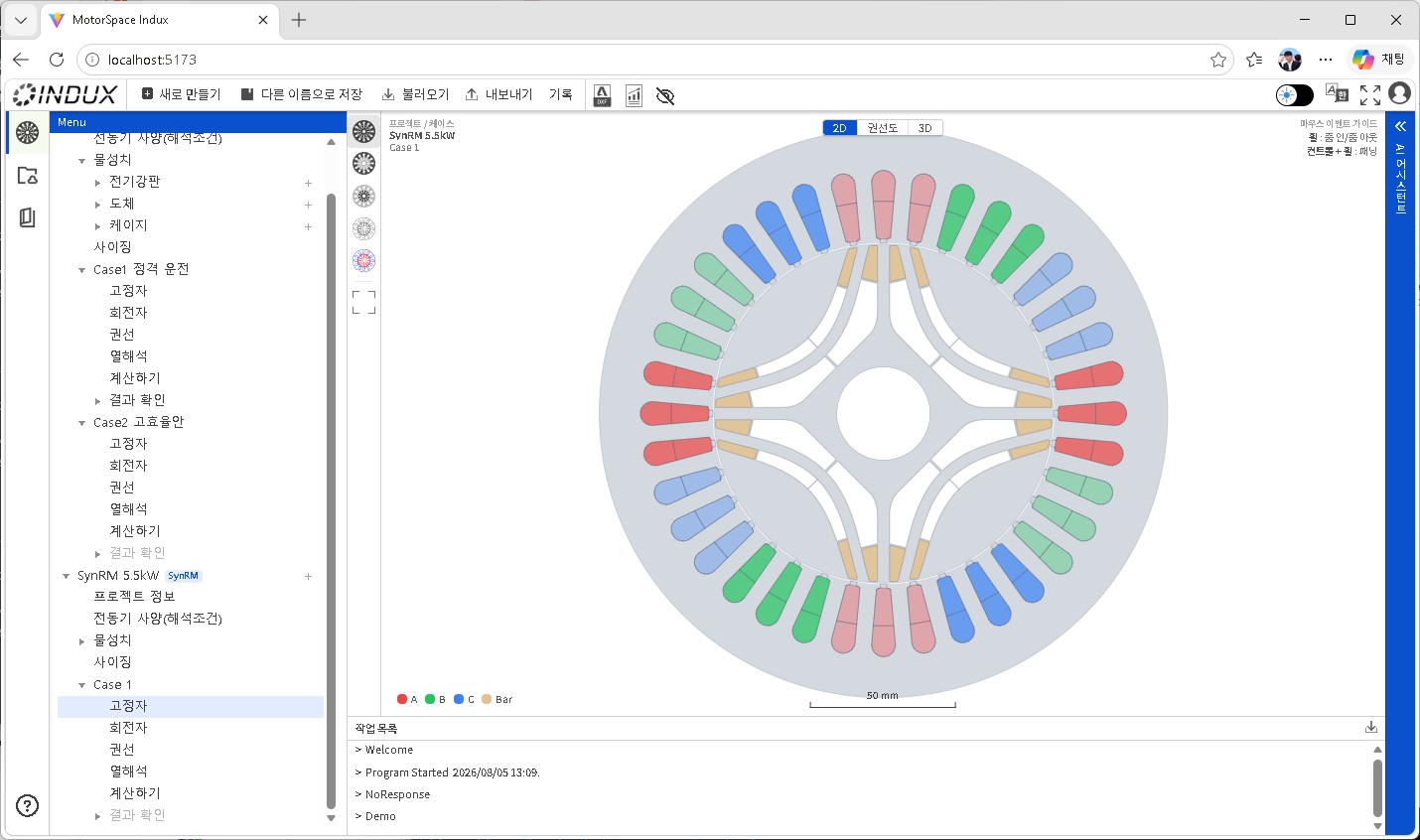
Rapidly size and analyze the performance of SynRMs, whose core design is challenging. Because the shape of the rotor's flux barriers determines performance in a motor without magnets, optimization theory is integrated into the sizing stage.
Interior permanent-magnet synchronous motor (IPMSM)
An IPMSM sizing and performance-analysis engine for motors that embed permanent magnets inside the rotor core to achieve high efficiency and power density.
- Magnetic-equivalent-circuit models covering embedded-magnet geometries such as V-type, bar-type, and delta-type
- Sizing empirical models that account for demagnetization margin
Why magnetic equivalent circuits?
At the initial stage of motor design, the goal is not one "accurate answer" but the ability to quickly compare multiple candidates across a design space. FEA is accurate, but mesh generation, boundary conditions, and convergence can take several to tens of minutes per case, making broad design-space exploration inefficient.
| Magnetic equivalent circuit (MEC) + empirical models | Finite element analysis (FEA) | |
|---|---|---|
| Calculation time per case | Seconds | Several to tens of minutes |
| Learning curve | Gentle — focused on specification input | Steep — meshing, boundary conditions, and solver options |
| Best suited for | Initial sizing and design-candidate comparison | Detailed verification and final design confirmation |
| Role in the Indux family | Indux MEC | Indux LFX (continues verification from an imported STEP file) |
Indux MEC does not replace FEA. It handles the stage where you quickly determine whether a design is reasonable and which candidate is appropriate. Once a design is selected, it transfers the aligned geometry as a STEP file to Indux LFX and eliminates the FEA-preprocessing work required to recreate it.
AI directly operates the design
The Indux MEC AI assistant does more than explain or make suggestions. It changes actual design parameters and runs calculations through the same path a person uses to change values in the tree menu. Say, "Increase the stator slot count to 36 and recalculate," and the values on screen and the result charts update in real time.
User  > Increase the stator slot count to 36 and recalculate.

AI    > Changed the slot count from 24 → 36 and recalculated.
        - Efficiency: 91.2% → 92.7% (+1.5%p)
        - Power factor: 0.83 → 0.81 (-0.02)

        The tree menu and 3D viewport have been updated in real time.
        Would you like to save this change to the project?

User  > Yes, save it.

AI    > [Awaiting approval] Save to the project file? [Approve] [Cancel]
The AI immediately executes changes to settings and calculations within the session because these changes can be undone at any time. It requests explicit human approval only when permanently saving to the project file.
Connect with any AI client: In addition to the in-app chat panel, which uses its own API key, standard MCP (Model Context Protocol) clients such as Claude Desktop and Claude Code can connect directly to the session. This also supports batch-generating and comparing large numbers of design candidates with scripts. Indux MEC does not charge for LLM usage; users can use their existing API keys and subscriptions.
Design workflow
- Create a project — Enter shared information such as materials and operating points (slip points to calculate).
- Create a case — Select the motor type (SCIM/LSPM/SynRM/IPMSM).
- Enter Machine Spec/Winding/Conductor/Stator/Rotor data — Enter values in forms or ask the AI using natural language.
- Run Solve — Calculations that can respond immediately run at once; nonlinear calculations requiring iterative convergence show progress and notify you when complete.
- Review results — Inspect performance curves such as efficiency, power factor, and torque, along with the 3D cross-section.
- Duplicate the case and change parameters until a suitable design is found (cut and try).
- Export drawings — DXF for manufacturing or STEP for FEM preprocessing.
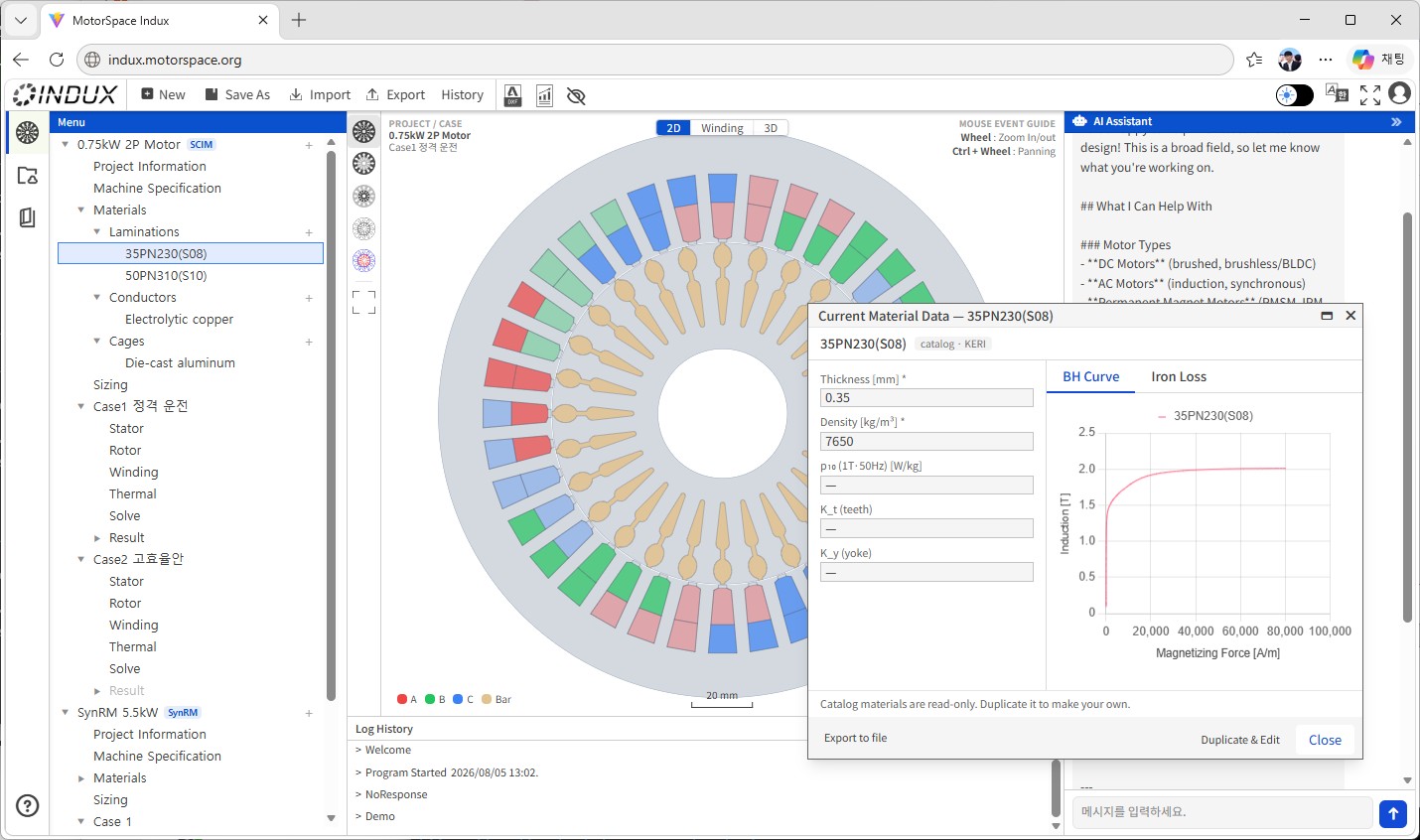
Material catalog — view and apply BH curves and core-loss data based on measured data provided by KITECH
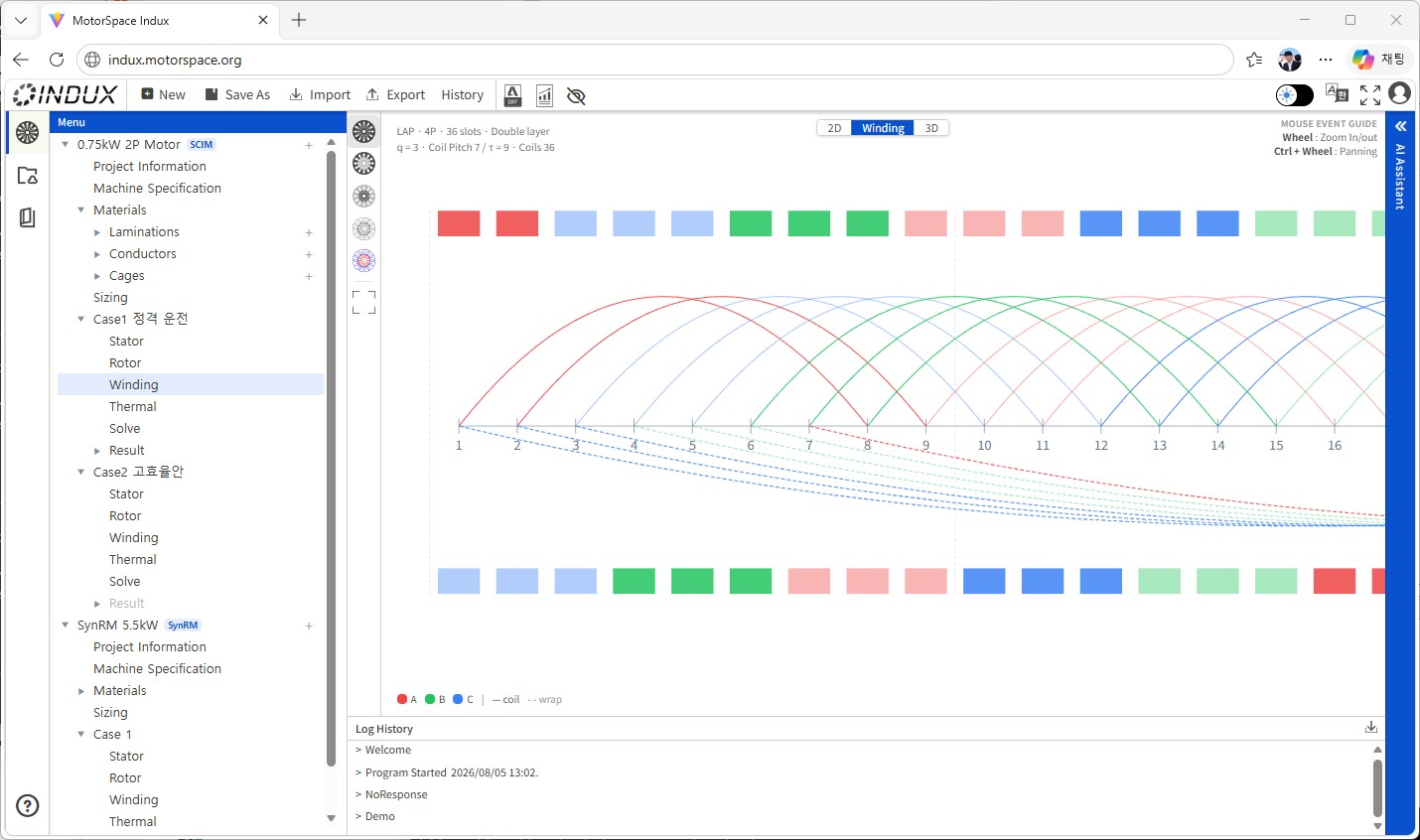
Winding stage — enter the pole count, slot count, and coil pitch to automatically calculate the phase winding layout
From design to verification with the neutral STEP format
Completed geometries can be exported as three types of STEP files that FEM programs can read directly: a complete 2D cross-section, a one-period 2D FEM sector, and a 3D model. During export, area and volume consistency are verified automatically, catching discrepancies between the geometry shown on screen and the actual CAD file in advance. Production drawings can also be exported immediately as DXF files.
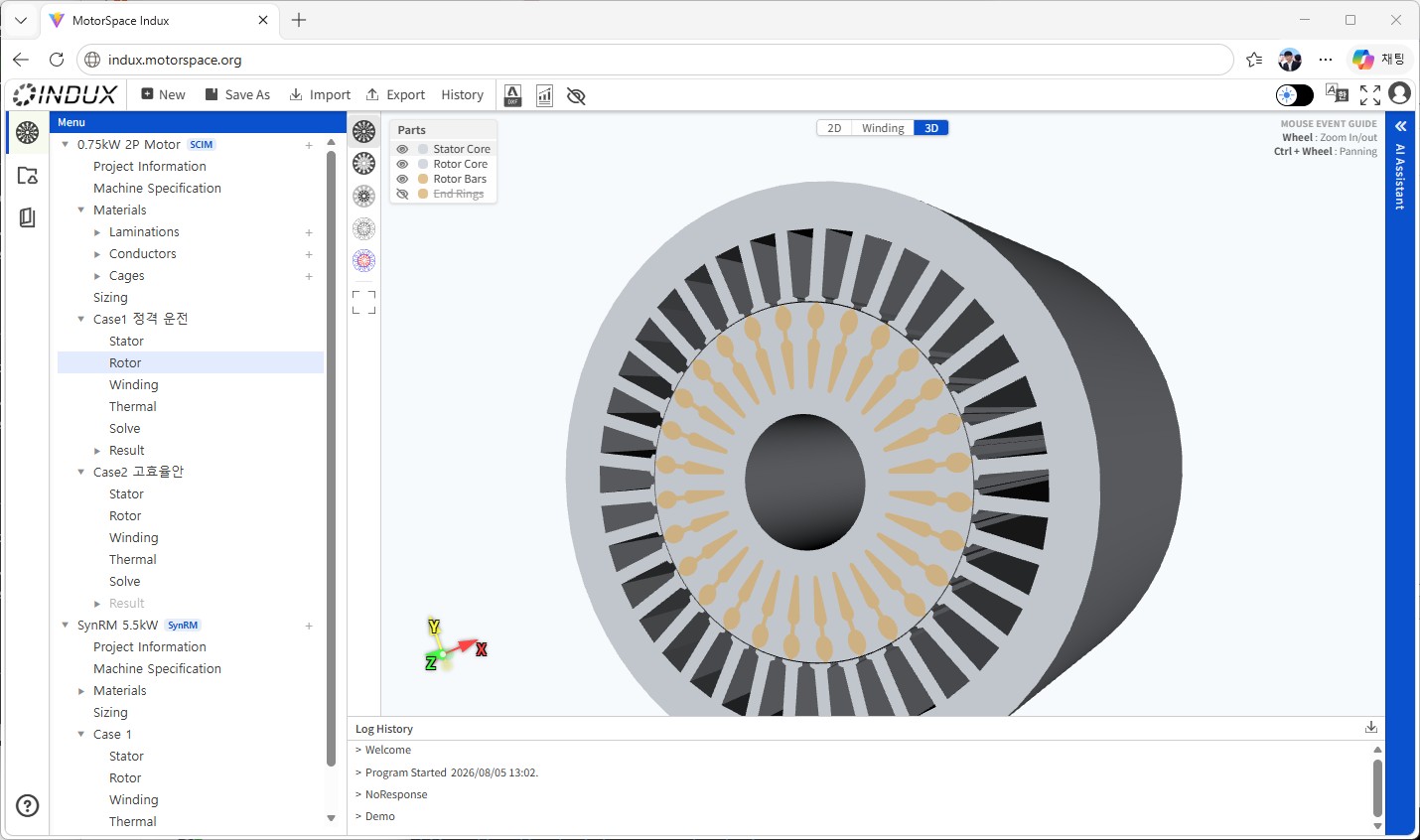
Immediately inspect the design geometry in 3D — this geometry is exported directly as a STEP file
The resulting geometry can be used with Indux LFX (electromagnetic FEA), Indux Mechanical (structural analysis), and Indux RotoDynamics (rotor dynamics) in the same Indux family. It can, of course, also be passed to third-party FEM tools.
What Indux MEC does not cover
We believe that honestly defining the scope is the beginning of trust. Indux MEC does not:
- Perform detailed finite element analysis (FEA) itself. That is the role of Indux LFX in the same product family. Indux MEC handles the preceding stage — initial sizing, candidate comparison, and STEP preprocessing.
- Perform structural analysis or rotor-dynamics analysis directly. These are handled by Indux Mechanical and Indux RotoDynamics, respectively.
- Currently provide an exact helical 3D geometry for skewed rotors. The 3D STEP model is currently based on straight rotor bars; 3D representation of skewed geometries is under development.
Ways to use it
| Access method | Intended users | Data location |
|---|---|---|
| Desktop app (primary) | Individuals and small companies, one-time purchase | Local file system |
| Cloud SaaS | Evaluation and demonstrations | Within the demo session |
| On-premises server (enterprise) | Company-wide, multiple sessions | The organization's own infrastructure |
All three methods use the same session architecture, so the workflow remains the same when a project created on the desktop is moved to an on-premises server, or vice versa. In on-premises server mode, design data does not leave the organization's own infrastructure.
Getting started
- Install or connect — Download the desktop installer, connect to the on-premises server URL provided by your organization, or try the web demo directly.
- Create a project — Start with a blank project or a design template for the target rated output range.
- Design your first case — Choose a motor type and fill in the forms, or tell the AI your target specifications, such as "Design a three-phase, 380 V, 15 kW, four-pole, IE4-class induction motor."
- Calculate and compare — Run the calculation with Solve, then duplicate cases and repeat the cut-and-try process until you are satisfied.
- Export — Pass the result to the next stage as DXF or STEP.
Frequently asked questions
Q. What happens if the AI assistant accidentally ruins a design? A. Changes made by the AI within a session, such as adjusting settings and running calculations, can always be undone. Human approval is required only when changes are permanently saved to the project file. You can experiment safely until saving.
Q. Can I use an LLM other than Claude? A. The in-app chat is not tied to a specific LLM provider and can be extended to other providers. The currently verified paths are Anthropic Claude and OpenAI ChatGPT.
Q. Can I use it without an internet connection? A. The desktop app runs locally, while only the AI features require an online connection. Without AI, the entire workflow — design, calculation, and drawing export — can be used offline.
Q. How does it relate to the existing IMCA, the induction-motor-only program? A. IMCA continues to be available as a dedicated induction-motor program. Indux MEC is the result of consolidating the magnetic-equivalent-circuit design and analysis tools previously provided separately for each motor type into one integrated application.
Q. How much confidence can I place in the calculation accuracy? A. Indux MEC is based on empirical models accumulated through joint development with KERI and KETI, along with measured material-property data provided by KITECH, and targets practical accuracy for the initial design stage. Final verification with FEM analysis such as Indux LFX is still recommended; Indux MEC's role is to dramatically reduce the time required up to that point.